
On January 1, 2027, Shopify is requiring that all public apps use expiring access tokens when they connect to the Shopify API. The requirement is already in place for apps created on or after April 1, 2026 but, starting next year, all public apps will stop working if they don’t upgrade. This will make apps safer, a stolen access token can only be used for up to an hour, but makes it harder to implement.
Expiring access tokens only last for an hour so you need to refresh them with Shopify for new tokens. You can only do this exchange once. This raises challenges if you’re running an app where different processes might be making calls to the Shopify API on behalf of the same shop. For example:
- How can you ensure that only one process makes the exchange for the token?
- How can you efficiently make API calls without constantly reloading the access tokens from the database?
- How do you handle failures in the token exchange?
- How can you confidently roll out expiring tokens to existing shops that have the app installed?
These questions were on our mind as we worked on migrating our Altera app to expiring tokens. Altera is an import/export app used by tens of thousands of Shopify stores and has a few challenges at scale:
- Import/export jobs can process millions of records and can run for a long time
- A store can have multiple jobs running at the same time
- Within a job, multiple threads might be making API requests to the same shop
In this post we’ll cover details of expiring tokens, how we implemented them in the app, and how we rolled out the changes to new and existing users.
Rules for Shopify’s Expiring Access Tokens
Instead of a single access token, now you get an expiring token and a refresh token. You can use the expiring token to make API requests for one hour, after which you need to get a new token from Shopify using the refresh token, which is valid for 90 days.
- You can only do this exchange once. After that the old refresh token is dead (Update: as of late August 2026 Shopify will let only disable the old refresh token after the new token is used. This will make the exchanges more resilient to failures.)
- After the exchange you get a new expiring token AND a new refresh token
- The old expiring token is still valid until its original expiration time.
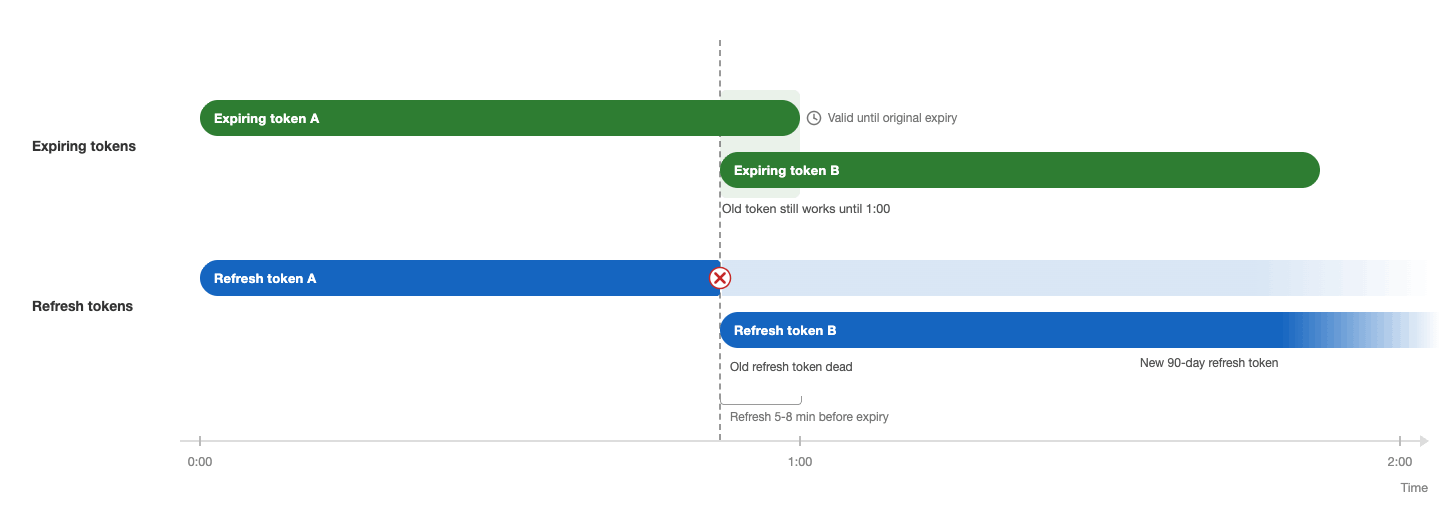
The benefit to expiring access tokens is that if an attacker gets a copy of your tokens, they would only be able to make API calls to Shopify for the remainder of the hour, until the token expired. If they got your refresh token too, they could exchange it for a new expiring token, but you would notice that because you would no longer be able to refresh your tokens. Compared to before, where an attacker would have access to the API forever, this is a big improvement in safety.
How To Coordinate Token Refreshes
When you’re making parallel requests to the Shopify API you need to make sure that you only make a single call to refresh the token. We do this with a row lock in our database.
We create a new table in our database named ShopToken which keeps track of the following for each shop:
- the expiring token and when it expires
- the refresh token and when it expires
- logging if there was an error refreshing the token
This gives a single row per shop that just has information related to the access tokens. We can use this to do a SELECT ... FOR UPDATE lock on this row while we’re exchanging the tokens. If another process tries to start a token exchange in the meantime, it will have to wait until the first process completes.
The logic looks something like this:
begin transaction

    -- Only one process can lock this row
    row = SELECT * FROM shop_token WHERE shop_id = ? FOR UPDATE

    -- Here we're guaranteed to be the only process accessing the row
    if row is still stale:                  -- Re-check with fresh data
        new_pair = POST to Shopify OAuth    -- Token exchange lock still held
        row.access_token  = new_pair.access_token
        row.refresh_token = new_pair.refresh_token
        row.expiries      = new_pair.expiries
        UPDATE shop_token SET ... WHERE shop_id = ?
    else:
      -- Another process already rotated the token
      -- No need to refresh again

-- Allow another process access to the row
commit
Altogether, this uses row-level locking to make sure that only one process at a time can perform the token refresh.
Making Token Refreshes More Robust
There are a few things we do at scale to avoid database load and to recover from failure.
When a job starts, it reads the token and its expiration time from the database. Then, it keeps making API calls using that token until it gets near to the expiration time, at which point it does an exchange. This prevents us having to look up the token every time we make an API call.
Each process picks a random time 5-8 minutes before the token expires to refresh. This prevents different processes from always retrying at the exact same time.
The exact time that we wait until refreshing the token is randomized. Each process will calculate a random time between 5 and 8 minutes before the token expires, and try to do a refresh once we reach that time. If for some reason a process has a token within five minutes of expiration it will try to refresh it immediately. This random jitter makes it less likely multiple processes will try a refresh at the same time.
If there’s an error refreshing the tokens, we also do one retry with the exact same payload (after a 1-second sleep if we receive an HTTP 500 response). We don’t want to hold the database lock for too long but if there’s a temporary connectivity error during the exchange this will hopefully resolve it.
When a user logs into the app we get a session token from Shopify. We know this token is valid so it’s safe to exchange it for a new expiring + refresh token. We do this at login, in the background, whenever it looks like the shop’s token appears broken. This is a fallback in case there’s ever an unrecoverable error with the exchange; reopening the app will fix it.
Lastly, we have a background task which runs daily and does an exchange for refresh tokens that are going to expire in 60 days. This gives us plenty of warning if there’s a problem refreshing the tokens and is usually only necessary for stores that haven’t been active in the last 30 days.
How We Tested Expiring Tokens
We built a server internally that mimics Shopify’s token exchange API. This server has the same API endpoints for exchanging tokens but will also produce errors like timeouts, dropped responses or dropped requests.
Then we made a script that would stress test this internal server using the same API client our app uses. The script would make a lot of API requests in parallel and we could verify that it handles errors correctly before we deployed the code to production.
Expiring Token Rollout
We wanted to take the migration slowly as this was a big change and a mistake could break our API access to stores. To support this, we made changes to the app so that it supported both legacy and expiring tokens.
Then we created a command we can run to do the one-time conversion of a legacy access token to an expiring token for one or more stores.
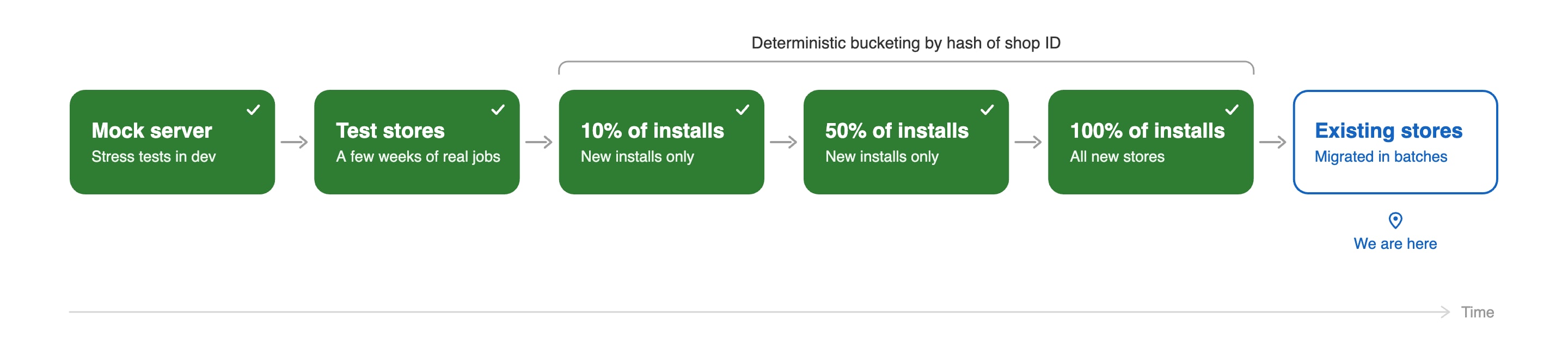
After we deployed the code we initially left all stores using the legacy access token and only enabled the expiring tokens on some test stores. We tested on these stores over a few weeks, including lots of API-intensive jobs running in parallel to make sure things ran smoothly.
Once we were confident that things worked on our testing stores, we started the rollout to 10% of new installs. After a while we increased that to 50% of new installs, and then 100%. Now all new stores were using expiring access tokens and we’re working backwards to migrate the remaining existing stores in batches.
A Few Gotchas
Throughout the process we ran into a few gotchas:
- Test the case where a store has a long-running job with a legacy token and you migrate it to a expiring tokens while the job is still running.
- Add a timeout to the row lock so a hung HTTP session won’t keep the lock indefinitely.
- In our testing, the
[API] Invalid API key or access token (unrecognized login or wrong password)HTTP 401 error can mean two things: either you’re using an expired token or the shop’s uninstalled your app and you haven’t processed the webhook yet. You can try another exchange under the lock to tell the two cases apart. - Use a deterministic method to bucket new installs. If you want to have 10% of new installs on expiring tokens, don’t use something like
random()but instead base it on a hash of the shop’s ID. This way reinstalls will always go to the same bucket. - If you’re using pgbouncer in transaction pooling mode, don’t use
pg_advisory_lockbecause it can leak across connections. Just stick with row locks.
Final Thoughts
We’re still in the process of migrating the final Altera installs to expiring access tokens but so far the process has gone surprisingly smoothly and as far as we can tell no user has been impacted. The expiring tokens do introduce more complexity but it’s a definite win for data security.
If anyone has any questions about implementing expiring tokens I’m on X at @1danielbeck.